A few years ago I helped a florist friend in Ohio rebuild her website three weeks before Valentine’s Day. Her old site looked pretty, but it had no delivery date picker, no cutoff times and a checkout that asked customers for a recipient’s address only after payment. She lost orders every day. That experience taught me something: a flower shop website is not a regular online store. Flowers are perishable, time-sensitive and emotional, and the site has to reflect all three.
WordPress, paired with WooCommerce, handles this well in 2026. Here is what to build, what to install and what to look for in a theme.
Start with the pages that actually earn orders
Most florists overbuild the navigation. Shoppers usually arrive with one of three needs: “I need something today,” “I need something for an occasion,” or “I want to see what you make.” Structure your pages around those.
The core set
- Home page: a clear promise (same-day delivery in your area, for example), a cutoff time banner, featured bouquets and a visible ZIP code checker.
- Shop and category pages: organize by occasion (birthday, sympathy, anniversary), by type (roses, peonies, plants) and by price band. Americans often shop by budget, so “Under $75” is a category worth having.
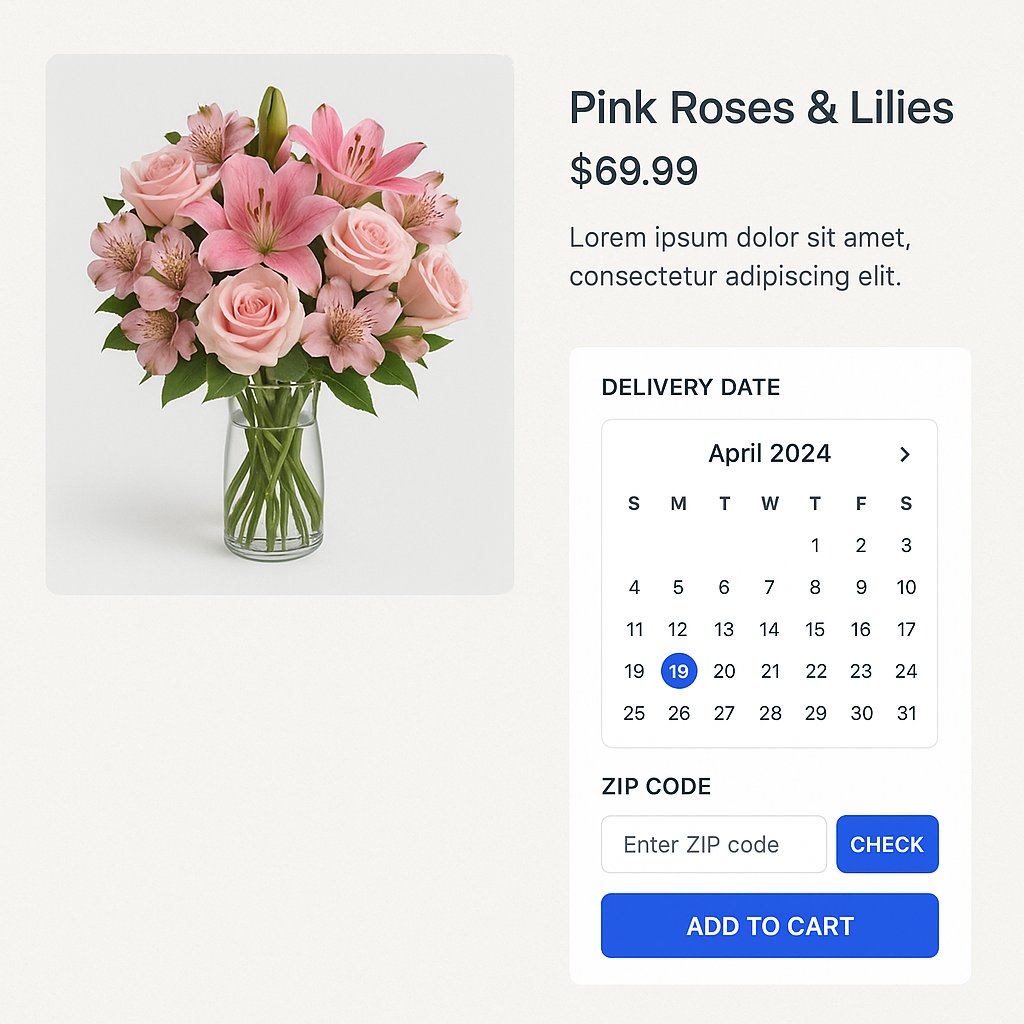
- Product pages: several photos, stem count, vase size, a substitution policy and a delivery date selector right on the page.
- Delivery information: zones, fees, cutoff times, holiday rules. Keep it short and specific.
- Weddings and events: a separate inquiry page with a form, a gallery and a few price ranges. These customers want a consultation, not a cart.
- Sympathy and funeral flowers: a dedicated, calmly written page. People searching here are stressed, so skip the clever copy.
- About, contact and FAQ: include a real address, phone number and photos of your actual team. Local trust matters.
Plugins that matter (and the ones that don’t)
WooCommerce is the foundation for nearly every flower shop on WordPress. On top of it, a short list of extensions does most of the heavy lifting. Resist the urge to install thirty plugins; each one adds weight and a potential conflict.
Functionality you need
- Delivery date and time slots: this is the single most important feature. Look for a plugin that supports cutoff times, blackout dates (Mother’s Day weekend capacity, for example), per-day order limits and different rules for pickup and delivery.
- Delivery zones by ZIP code: WooCommerce’s built-in shipping zones can restrict delivery by postal code and set fees per area. Often that is enough without any extra plugin.
- Gift message and recipient fields: a card message box, recipient name and phone number, plus a “don’t reveal the sender” option. Customize the checkout so these come first.
- Product add-ons: let customers upgrade to a bigger size, add a vase, chocolates or a balloon. Done without pressure, add-ons raise the average order naturally.
- Payments: Stripe and PayPal cover most needs; add Apple Pay and Google Pay, since many orders come from phones.
- Sales tax: US tax rules vary by state and sometimes by city. Check how your state treats delivery charges, and use WooCommerce’s tax settings or an automated tax service if you ship across state lines.
Under-the-hood plugins
- SEO plugin (Yoast, Rank Math or similar) plus local business schema, so Google understands your address, hours and service area.
- Caching and image optimization: flowers mean big photos, and big photos mean slow pages unless you compress them and serve modern formats like WebP or AVIF.
- Security and backups: a firewall plugin and automated daily backups. A hacked site in the week of Valentine’s Day is a disaster you can easily prevent.
- Email and SMS: order confirmations that include the delivery date, plus optional reminders for birthdays and anniversaries, which are quietly the best repeat-order tool a florist has.
Theme features worth paying attention to
Themes are tempting because demos look gorgeous. Flowers photograph well, so almost any theme looks good with the right pictures. Judge a theme on the less glamorous details instead.
- Full WooCommerce compatibility: check that the theme supports the current WooCommerce checkout blocks, not only the older shortcode checkout.
- Speed: test the demo in a page speed tool. Aim for a fast mobile load, since most flower orders in the US now start on a phone.
- Block editor or Site Editor support: block themes let you change seasonal banners yourself without a developer, which is handy when Valentine’s Day, Mother’s Day and the holidays all need their own look.
- Large, flexible product galleries: zoom, swipe and a consistent image ratio, so that mixed bouquet photos do not look messy in a grid.
- Sticky add-to-cart and a simple mobile menu: small things that reduce friction.
- Accessibility: readable contrast, keyboard navigation and alt text. It is good practice and reduces legal risk under ADA-related claims.
Mistakes I see again and again
Photos from stock libraries are the first. Customers want to see the bouquet they will receive, so photograph your real arrangements in natural light. Second, hiding delivery fees until the last checkout step. Third, forgetting about peak days: set order limits ahead of time, so you never accept thirty more deliveries than your van can handle. Finally, skipping a test order. Before launch, place several yourself from a phone, using different ZIP codes, and read every email the system sends.
Where to go from here
You do not need a huge budget to build a good flower shop site. You need clear pages, a reliable delivery date system, a fast theme and honest photos. Start with WooCommerce and one carefully chosen delivery plugin, launch with a small catalog, and expand after you see which bouquets actually sell. If you want to go deeper, explore WooCommerce’s documentation on shipping zones and checkout customization, and test two or three delivery date plugins on a staging site before you commit.